An Important Update is Available for Stiletto 2
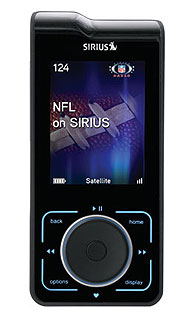
To improve performance and reflect changes in the SIRIUS XM lineup of channels, a software update for Stiletto 2 is available which features new channel logos, wallpapers and audio channel IDs.
SIRIUS XM Satellite Radio is providing an Update and Return
Program at no charge to current SIRIUS XM subscribers with a Stiletto 2.
If your Stiletto 2 has an active subscription and you would like SIRIUS XM
Satellite Radio to perform the update for you, please follow the
instructions below.
Please note:
Only Stiletto 2 radios with an active subscription are eligible for this Update and Return program.
This Update and Return Program is available for a limited time only. No claims will be accepted after July 31, 2013.
How it works:
1.
SIRIUS XM Satellite Radio will pay the cost of updating your Stiletto 2 and return shipping.
2.
You are required to pay for shipping your Stiletto 2 to the SIRIUS XM authorized service center.
3.
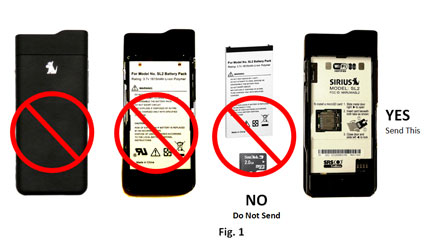
Send only the Stiletto 2 radio - no docks, accessories, ear buds, batteries or battery covers should be sent. Please remove the Stiletto 2 battery, battery cover and SD card before shipping and keep them safe with your other accessories. IMPORTANT: SIRIUS XM is not responsible for returning any accessories sent with the Stiletto 2.
4.
SIRIUS XM Satellite Radio will make every effort to retain all recorded and personal media on your Stiletto 2, but cannot guarantee that it will not be erased.
a.
Customers are encouraged to back up all personal music and media before sending their Stiletto 2 as part of the Update and Return Program.
b.
Recorded SIRIUS XM content cannot be backed up or copied from the Stiletto 2.
5.
Your Stiletto 2 will be updated and shipped back to you within 10 business days of receipt.
a.
Retain your claim number to return to this website to track the progress of your Stiletto 2 update. Your claim status will be updated with the following information:
i.
Date when received by SIRIUS XM
ii.
Date when shipped
iii.
UPS tracking number for shipment
b.
You will receive an email with the UPS tracking Number when your updated Stiletto 2 is shipped back to you.
Instructions for sending in your SIRIUS XM Stiletto 2:
1.
Fill out the information in the online form below.
2.
Print out the shipping information by clicking FILE and PRINT in your browser. This shipping information includes your claim number, to track progress of your Stiletto 2 update.
3.
Remove the SD card, battery, and battery cover and store in a safe place. Do not send these parts. Safely pack the Stiletto 2 media player in a suitable container. Do not include any accessories. IMPORTANT: SIRIUS XM is not responsible for returning any accessories sent with the Stiletto 2.
4.
Write or print the shipping address clearly on your packaging. This address will be provided to you after filling in the online form below.
5.
Insure your shipment and use a delivery confirmation service. SIRIUS XM is not responsible for radios lost or damaged during shipment.
ONLY 1 UNIT PER REQUEST.
**All fields are required unless otherwise noted.
Unit Info
Model Number:
SIRIUS SL2
SID:
SID is printed below the bar code on the rear label of the device
Purchase Date:
Personal Info
First Name:
Last Name:
Address:
** this address MUST be the delivery address for the return of your unit. Please do not enter P.O. box, APO or FPO addresses.